.png?width=800&height=160&name=Untitled%20(4).png)
The TrailIntel web and mobile apps come preloaded with trails, points of interest, and many other features uploaded by riders and clubs in your community.
Points of interest are preloaded destinations built into our map data - think food, fuel, lodging, etc. Waypoints are custom locations that you can save privately to your own profile.
Here is a legend of what each icon means:
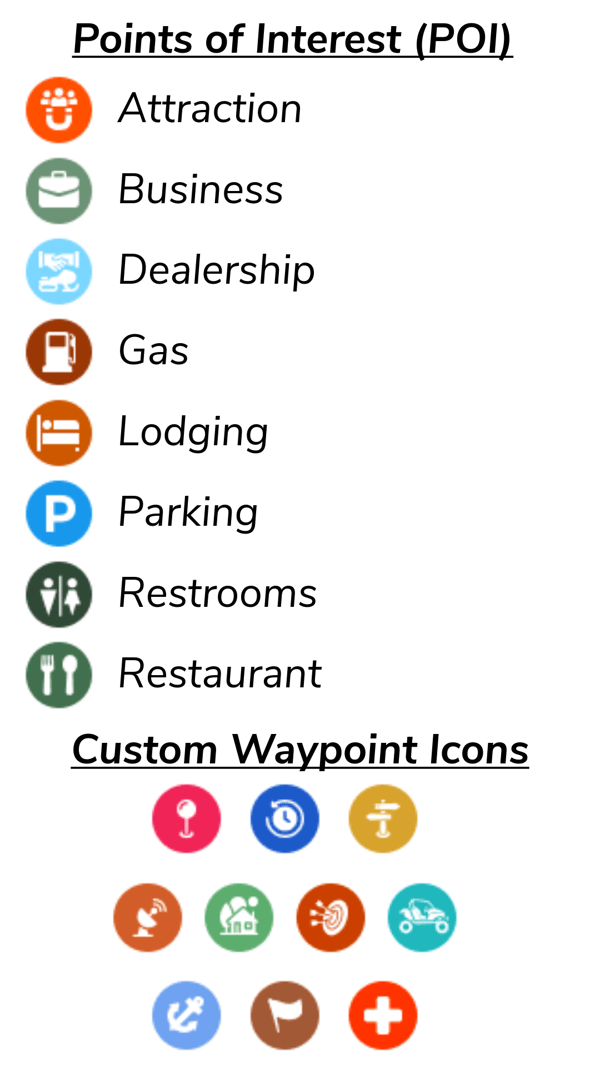
| Icon Description | Category |
|---|---|
| Orange circle with white avatar icons and a magnet | Attraction |
| Light green circle with a white briefcase | Business |
| Light blue circle with a white handshake above a snowmobile | Dealership |
| Brown circle with a white gas pump | Gas |
| Orange circle with a white bed | Lodging |
| Blue circle with a white letter "P" | Parking |
| Dark green circle with white restroom symbols | Restrooms |
| Green circle with white fork and spoon | Restaurant |
As for the custom waypoints, you can choose your own icon and give the point any title and description. The icons are described below:
-
Pink circle with white pinpoint icon
-
Blue circle with white rewind icon
-
Gold circle with white signpost icon
-
Orange circle with white satellite dish icon
-
Light green circle with white house and tree icon
-
Orange-red circle with white bullseye target icon
-
Teal circle with white side by side icon
-
Light blue circle with white anchor icon
-
Brown circle with white flag icon
-
Bright orange-red circle with white cross icon
Garmin users
Points of interest are searchable in the Garmin GPS when loaded with our maps, but do not display on the map the same manner. Some devices display points of interest on the map with the trails, but most do not. Refer to your owner's manual for more info on displaying points of interest. Custom waypoints can be created on your Garmin GPS, and soon, we can sync your TrailIntel favorite waypoints with your Garmin through our map installer. Stay tuned!